

Every hospital IT team eventually asks the same question: are we actually HIPAA compliant, or just hoping we are? A hipaa it compliance checklist turns that guesswork into something you can verify system by system, from your network closets to your backup servers. Without it, gaps hide in places you’d never think to check, like an unencrypted access point in a nurses’ station or a firewall rule nobody’s reviewed since 2022.
This guide gives you the specific technical safeguards HIPAA requires: access controls, encryption standards, audit logging, backup protocols, and the security policies that tie them together. You’ll walk away knowing exactly what auditors and OCR investigators look for, not just what the regulation vaguely implies.
We built this checklist from real installations in hospital environments, where the components of a structured cabling system, network segmentation, and medical equipment integration all intersect with compliance requirements. Whether you’re auditing an existing system or planning a new buildout, the sections ahead cover each safeguard in order, so you can move through your infrastructure methodically instead of chasing compliance after a breach forces the issue.
Why IT systems need their own HIPAA checklist
HIPAA itself never mentions firewalls, encryption algorithms, or backup schedules. The Security Rule tells covered entities to protect electronic protected health information (ePHI) with "reasonable and appropriate" safeguards, then leaves the actual engineering up to you. That vagueness works fine for lawyers writing policy, but it leaves IT teams guessing at implementation. A hipaa it compliance checklist exists precisely to close that gap, translating regulatory language into configurations, permissions, and logs you can point to during an audit.
The Security Rule leaves technology decisions to you
Read the actual text of the HHS Security Rule and you’ll find categories, not instructions. It groups requirements into administrative safeguards (policies, training, risk analysis), physical safeguards (facility access, workstation security), and technical safeguards (access control, audit controls, transmission security). Each category lists what must happen, rarely how. That’s by design; HHS wanted the rule to apply to a five-person clinic and a 900-bed hospital system alike. But it means two organizations can both claim compliance while running wildly different infrastructure, one with multi-factor authentication and encrypted backups, the other with a shared admin password and a NAS drive nobody’s patched since installation.
A regulation that says "reasonable safeguards" isn’t a checklist. You have to build the checklist yourself, or find one built by people who’ve done this before.
What a compliance gap actually costs
Healthcare data breaches aren’t rare, and they aren’t cheap. IBM’s Cost of a Data Breach Report has consistently ranked healthcare as the most expensive industry for breach recovery, with average costs running well above $10 million per incident when you factor in remediation, notification, and regulatory penalties. OCR enforcement adds another layer: settlements for insufficient risk analysis, missing encryption, or unpatched systems routinely land in the six- and seven-figure range. Those numbers matter for budget conversations, but the operational disruption often hurts more. A ransomware event that locks an EHR system doesn’t just risk a fine, it can shut down patient scheduling, delay lab results, and force staff back to paper charts for days.
Technical safeguards carry most of the weight
Of the three safeguard categories, technical controls are where most breaches actually originate, and where an IT team has the most direct control. Administrative policies matter, but a written password policy doesn’t stop a phished credential from reaching an unsegmented network. The table below shows how the categories break down and where IT ownership concentrates.
| Safeguard category | Who typically owns it | Example requirement |
|---|---|---|
| Administrative | Compliance officer, HR | Risk analysis, workforce training, sanction policy |
| Physical | Facilities, security | Locked server rooms, workstation placement, device disposal |
| Technical | IT and network engineering | Access controls, encryption, audit logs, automatic logoff |
Notice how the technical column maps almost entirely onto infrastructure decisions: how you segment networks, what encryption you enforce, who has admin rights on which systems. That’s the layer this checklist focuses on, because it’s the layer where a single misconfiguration, an open RDP port, a shared login, an unencrypted backup drive, turns into the headline. Hospitals running structured cabling and medical device integration with EHR systems face an added wrinkle: every networked infusion pump, imaging system, and nurse call station is a potential ePHI touchpoint, which means the technical safeguard checklist has to extend past servers and laptops into the equipment itself.
Step 1. Conduct a HIPAA risk assessment
Every HIPAA IT compliance checklist starts here, because you can’t secure what you haven’t inventoried. A HIPAA risk assessment is the formal process of identifying every system that creates, stores, or transmits ePHI, then evaluating the threats and vulnerabilities each one faces. Skip this step and everything downstream, your access controls, your encryption choices, your monitoring setup, ends up built on guesswork instead of evidence.
If you can’t list every place ePHI lives on your network, you can’t claim you’ve assessed the risk to it.
Map every system that touches ePHI
Grab a floor plan and a network diagram, because this assessment has to cover physical and digital ground at once. List EHR servers, workstations, mobile devices, networked medical equipment, backup systems, and any cloud services that store patient data. Hospitals planning network infrastructure for a healthcare campus often discover shadow systems during this step, an old imaging workstation still on the network, a nurse call station nobody remembers configuring. Document each one, including its location, its data flow, and who administers it.
Score threats against real-world likelihood
Once you have the inventory, rank each system by two factors: how likely a threat is to materialize, and how much damage it would cause if it did. A checklist that works in practice looks like this:
- Identify the asset: server, device, application, or data repository
- List plausible threats: phishing, ransomware, insider misuse, physical theft, equipment failure
- Rate likelihood: low, medium, high, based on current controls
- Rate impact: minor disruption versus full ePHI exposure
- Assign a risk score: likelihood multiplied by impact, used to set remediation priority
This scoring exercise is what separates a real assessment from a checkbox exercise. The HHS Security Risk Assessment Tool gives smaller organizations a structured starting point, though larger hospital systems usually need a more granular, department-by-department version.
Document findings and set remediation deadlines
Results have to go somewhere durable, not just in someone’s head. Write up findings in a report that lists each identified risk, its score, and a remediation deadline tied to an owner, not just a department. OCR investigators ask for this documentation first when a breach investigation starts, and "we did an assessment but didn’t write it down" is functionally the same as not doing one. Treat this report as a living document too: rerun the assessment annually, and immediately after any major infrastructure change, new EHR rollout, acquired facility, or added vendor integration, since each of those shifts your actual risk profile.
Step 2. Control who can access PHI
Once you know where ePHI lives, the next question is who can reach it. Access control is the technical safeguard most often cited in OCR settlements, usually because someone kept admin rights long after they changed roles or left the organization. Building this correctly means assigning access by job function, not convenience, and reviewing it often enough that old permissions don’t quietly accumulate.
Assign access by role, not by request
Start with role-based access control, where permissions map to job function instead of individual preference. A billing clerk needs different data than a charge nurse, and neither should have admin rights to the EHR database just because it’s faster than filing a request. Build your permission structure around these principles:
- Least privilege: grant only the access required for the current job, nothing extra
- Role-based groups: assign permissions to a role, then add users to that role, instead of configuring access person by person
- Time-limited elevated access: temporary admin rights expire automatically, they don’t linger after a project ends
- Immediate deprovisioning: disable accounts the day someone leaves or changes departments, not at the next scheduled review
A former employee’s still-active login is one of the easiest ways a hospital ends up in an OCR settlement.
Require multi-factor authentication everywhere ePHI lives
Passwords alone stopped being adequate protection years ago. Every system that touches ePHI, the EHR, remote access portals, cloud storage, even networked medical devices with login capability, should require multi-factor authentication. This single control blocks the majority of credential-based breaches, since a stolen password without the second factor is useless to an attacker. Microsoft’s own security research has found that MFA blocks over 99% of account compromise attacks, which makes it one of the highest-return safeguards on this entire checklist.
Audit access lists on a fixed schedule
Access control isn’t a one-time configuration, it decays without maintenance. Set a recurring calendar reminder, quarterly at minimum, to pull a full list of who has access to each ePHI system and compare it against current staffing. Flag anyone whose role changed, anyone who’s been inactive for 90 days, and any shared or generic login accounts still in use, since those defeat the entire purpose of individual accountability. Hospitals with high staff turnover in clinical departments should tighten that review cycle to monthly, because a nurse who transferred units last week still has EHR access from her old floor unless someone actively removes it.
Step 3. Encrypt PHI at rest and in transit
Encryption is the safeguard that turns a stolen laptop or intercepted network packet from a breach into a non-event. HIPAA technically lists encryption as "addressable" rather than mandatory, but in practice, if you skip it and something goes wrong, you’ll need airtight documentation explaining why an equivalent control was better. Most hospital IT teams skip that argument entirely and just encrypt everything, because it’s cheaper than the alternative.
Lock down data at rest
Every system that stores ePHI needs encryption applied to the data itself, not just to the network around it. That means encrypting EHR databases, backup drives, laptop hard disks, mobile devices, and any cloud storage bucket holding patient records. The current baseline most auditors expect is AES-256 encryption, which NIST recognizes as suitable for protecting sensitive federal and healthcare data. Full-disk encryption on every workstation and mobile device closes one of the most common breach vectors: a stolen laptop that never should have contained readable ePHI in the first place.
An unencrypted laptop with patient records on it isn’t a HIPAA violation waiting to happen. It’s already one, the moment it goes missing.
Encrypt everything moving across the network
Data in transit needs its own layer of protection, separate from at-rest encryption, because packets crossing a network are vulnerable in ways stored files aren’t. Enforce TLS 1.2 or higher for any application transmitting ePHI, including patient portals, EHR web interfaces, and integrations with billing or lab systems. Remote access into the network, whether for staff working off-site or vendors doing equipment maintenance, should run through a VPN with encrypted tunnels, never a bare RDP connection exposed to the internet. Networked medical devices deserve specific attention here too, since older equipment sometimes ships with outdated TLS versions or none at all, and the standards that govern how devices exchange clinical data vary widely by vendor, a gap that structured cabling and headend buildout projects frequently surface during network segmentation work.
Manage your encryption keys like a separate asset
Encryption only protects data if the keys stay protected too. Store keys separately from the data they unlock, rotate them on a defined schedule, and restrict key access to a small number of named administrators rather than a shared IT credential. A quick reference for what to check:
- At rest: AES-256 minimum, applied to databases, backups, laptops, mobile devices
- In transit: TLS 1.2+ for applications, VPN for remote access, encrypted tunnels for vendor connections
- Key management: separate storage, scheduled rotation, limited named access
Get these three layers right and encryption stops being a checkbox and starts functioning as the safety net it’s meant to be.
Step 4. Set up audit logs and system monitoring
Access controls tell you who’s allowed in. Audit logs tell you who actually walked through the door, and what they touched once inside. HIPAA’s technical safeguards require audit controls that record activity on any system holding ePHI, but the real value shows up months later, when you’re trying to reconstruct exactly what happened during a suspected breach and the logs either exist or they don’t.
What to log and where
Every system touching ePHI needs logging turned on by default, not enabled after something goes wrong. Capture logins and failed login attempts, record access, permission changes, file exports, and any configuration changes to firewalls or servers. A practical logging baseline looks like this:
- Authentication events: successful and failed logins, password resets, MFA challenges
- Data access: which user opened which patient record, and when
- Administrative changes: permission grants, account creation, role modifications
- System events: firewall rule changes, software installs, patch deployments
- Export activity: any file, report, or dataset leaving the system
Networked medical devices and imaging systems often get skipped here because vendors don’t advertise logging capability. Ask the vendor directly during procurement, and compare integration partners for networked clinical devices, since a device that can’t log access is a device you can’t fully secure.
Reviewing logs before an attacker does
Collecting logs without reviewing them is just expensive storage. Feed logs into a centralized system, a SIEM tool if your budget allows it, or at minimum a log aggregator that flags anomalies automatically. Set alerts for patterns that matter: repeated failed logins, access attempts outside normal hours, or a single account pulling an unusual volume of patient records in a short window.
Logs nobody reviews are indistinguishable from no logs at all.
A simple alerting rule might look like this in plain language, regardless of which platform runs it:
ALERT IF failed_login_count > 5 within 10 minutes FROM same_user
ALERT IF record_access_count > 50 within 1 hour FROM single_account
ALERT IF admin_privilege_granted OUTSIDE business_hours
Retention and audit trail integrity
Retain logs for at least six years to match HIPAA’s documentation retention standard, and store them somewhere separate from the systems they’re monitoring. If an attacker who compromises a server can also delete its logs, the audit trail was never trustworthy to begin with. Write access to log storage should be restricted just as tightly as ePHI itself, since a tampered log is worse than a missing one, it gives investigators false confidence in a record that’s already been altered.
Step 5. Secure backups and disaster recovery
Ransomware doesn’t ask permission before encrypting your EHR database, and when it hits, your backup strategy determines whether that’s a bad afternoon or a six-figure catastrophe. Backups and disaster recovery planning sits at the intersection of HIPAA’s technical safeguards and basic operational survival, since a hospital that can’t restore patient records within hours risks both regulatory penalties and actual patient harm. This step of your hipaa it compliance checklist covers what to back up, how often, and how you’d actually recover if the primary system disappeared tonight.
Follow the 3-2-1 backup rule
Build your backup architecture around a structure that survives more than one point of failure. The widely used 3-2-1 rule works well for ePHI environments:
- Three copies of every dataset containing ePHI, the production copy plus two backups
- Two different media types, such as disk and cloud storage, so a single storage failure can’t wipe out everything
- One copy offsite, physically or geographically separated from the primary facility, so a fire, flood, or ransomware attack on the main site doesn’t touch it too
Encrypt every backup copy at the same AES-256 standard you apply to production data. An unencrypted backup drive sitting in a closet is just as much a breach risk as an unencrypted laptop.
A backup you haven’t tested is a hope, not a plan.
Test restoration, don’t just schedule it
Scheduling nightly backups is the easy part. Verifying that you can actually restore from them is where most organizations quietly fail. Run a full restoration test at least twice a year, ideally quarterly for systems holding critical patient data, and time how long recovery actually takes. Compare that number against your recovery time objective (RTO), the maximum acceptable downtime your organization has defined for each system. If restoring the EHR takes fourteen hours but your RTO says four, you have a gap that no amount of backup frequency will fix on its own.
Write a disaster recovery plan people can follow under pressure
A disaster recovery plan that only makes sense to the person who wrote it fails exactly when you need it most. Document specific steps: who declares an incident, which systems get restored first, where the offsite backup credentials live, and who has authority to bring systems back online. Keep a printed copy somewhere accessible, ideally outside the server room itself, since a plan stored only on the network you’re trying to recover is a plan you can’t reach. Review and update it every time your infrastructure changes, new servers, added facilities, or a shift in which vendor hosts your backups, so the document on file matches the systems it’s supposed to protect.
Step 6. Harden networks, devices, and endpoints
Hardening the network is where a HIPAA IT compliance checklist stops being paperwork and starts being infrastructure. Network segmentation keeps a compromised guest Wi-Fi network from ever touching an EHR server, and it’s one of the fastest ways to shrink your breach exposure without buying new hardware. Most hospitals still run flat networks where a phished credential on the guest network can reach clinical systems, which is exactly the misconfiguration OCR investigators flag first.
Segment your network by function
Split the network into isolated zones: clinical systems, guest Wi-Fi, administrative workstations, and networked medical devices each need their own VLAN with firewall rules controlling what can talk to what, which starts with how you install and configure the network switch. A nurse call station has no reason to reach the billing database, and a guest laptop has no reason to reach either one. Facilities running structured cabling and headend buildout projects often rebuild segmentation from scratch during that work, since legacy wiring rarely matches current traffic patterns, which makes it worth revisiting how to design a network from the ground up.
A flat network turns one compromised device into a compromise of everything.
Patch and manage endpoints on a schedule
Every workstation, server, and mobile device needs a defined patch cycle, not an ad hoc one triggered by a vendor email. Build your endpoint hardening around a short, enforceable list:
- Critical patches: applied within 72 hours of release
- Standard patches: applied within 30 days on a scheduled maintenance window
- Endpoint protection: antivirus and endpoint detection running on every device that touches ePHI
- Device inventory: a current list of every workstation, tablet, and mobile device with its patch status
- Removable media controls: USB ports locked down or monitored on systems storing patient records
Unpatched systems show up in nearly every major OCR settlement involving ransomware, and it’s usually a server nobody remembered still existed.
Secure Wi-Fi and RF systems in clinical spaces
Wireless networks and RF systems in commercial and hospitality-adjacent healthcare settings deserve their own scrutiny, since they’re often installed years apart from the rest of the network and configured by different vendors. Require WPA3 or WPA2-Enterprise on any wireless network reaching clinical devices, disable WPS entirely, and rotate credentials whenever staff turnover touches anyone with network admin access. Hospitals working through RF and network installation projects should treat every access point as a potential ePHI touchpoint, not just an amenity for staff phones, since a poorly secured wireless bridge is often the easiest way into an otherwise well-segmented network.
Step 7. Manage business associate agreements
Every vendor that touches ePHI on your behalf, cloud hosting providers, billing services, IT support contractors, even the company that maintains your networked medical equipment, needs a signed business associate agreement (BAA) before they get access. This is the part of a hipaa it compliance checklist that IT teams sometimes treat as a legal formality, but a missing or outdated BAA is one of the fastest ways to turn a routine vendor relationship into a reportable breach. If a contractor mishandles patient data and no BAA exists, your organization owns that failure just as much as they do.
Identify every vendor that qualifies
Start by listing anyone with access to ePHI, whether they store it, transmit it, or just glance at it during support calls. That list runs longer than most IT teams expect:
- Cloud and hosting providers storing EHR data, backups, or imaging files
- IT support contractors with remote access to servers or workstations
- Medical equipment vendors who service networked devices generating patient data
- Billing and clearinghouse services processing claims with patient identifiers
- Answering services or telehealth platforms handling patient communications
Any vendor missing from this list is a vendor you haven’t actually assessed for risk.
Verify the agreement covers technical safeguards, not just liability
A BAA that only addresses legal liability without specifying technical expectations leaves gaps a good agreement should close. Confirm the document requires the vendor to encrypt ePHI, report breaches within a defined window, typically 60 days under the HHS Breach Notification Rule, and allow your organization to audit their security practices on request. Vendors resistant to these terms are telling you something about how seriously they treat patient data, so build those requirements into your RFP for IT consulting services before you shortlist anyone.
A signed BAA without enforceable technical requirements protects nobody when the vendor’s server gets breached.
Track renewals and offboarding like access permissions
Agreements expire, vendors get acquired, and contracts lapse quietly while access stays active. Maintain a tracking sheet with renewal dates, scope of access, and a contact for each vendor, then review it on the same quarterly cycle you use for internal access audits. Revoke vendor access immediately when a contract ends, not when someone remembers to submit the ticket, since a former contractor’s still-active VPN credential is functionally identical to a former employee’s, and just as likely to show up in an OCR investigation.
Step 8. Train staff and document your safeguards
Every technical safeguard on this list fails the moment a nurse writes her password on a sticky note or a new hire clicks a phishing link during her first week. Staff training turns policy into behavior, and it’s the safeguard OCR investigators check first when a breach traces back to human error rather than a technical flaw. Pair that training with thorough documentation, because a safeguard nobody wrote down is a safeguard you can’t prove existed.
Train every role that touches PHI, not just IT
General security awareness training covers phishing recognition, password hygiene, and physical security basics, but it has to go further for staff who directly handle patient records. Build role-specific modules for front desk staff, clinical teams, and billing departments, since each group faces different exposure. A workable training cadence includes:
- Onboarding training completed before system access is granted, not after
- Annual refreshers covering current threats, updated policies, and recent incidents
- Phishing simulations run quarterly, with follow-up coaching for anyone who clicks
- Role-specific modules for clinical, billing, and IT staff addressing their specific ePHI exposure
- Signed acknowledgment confirming each employee understood the material, kept on file
Untrained staff are the easiest way into an otherwise well-secured network.
Document every safeguard as if an auditor is already reading it
Written policy is what separates a defensible compliance program from a collection of good habits nobody can prove. Maintain a policy library covering access control, encryption standards, incident response, and acceptable use, then keep it alongside your risk assessment reports, audit logs, and BAA tracking sheet. When OCR opens an investigation, they ask for documents first and configurations second, so a hospital with strong technical controls but no paper trail still struggles to demonstrate compliance.
Keep the sanction policy real, not theoretical
A policy without consequences trains nobody. Define what happens when someone violates access rules, whether that’s a first-offense warning or immediate termination for repeated or willful violations, and apply it consistently regardless of seniority. Review your entire documentation set annually and after any major incident, since a policy manual describing last year’s infrastructure protects nobody today. Structured cabling upgrades, new EHR modules, and added vendor integrations all shift what your written safeguards actually need to say.
Making IT compliance a habit, not a one-time project
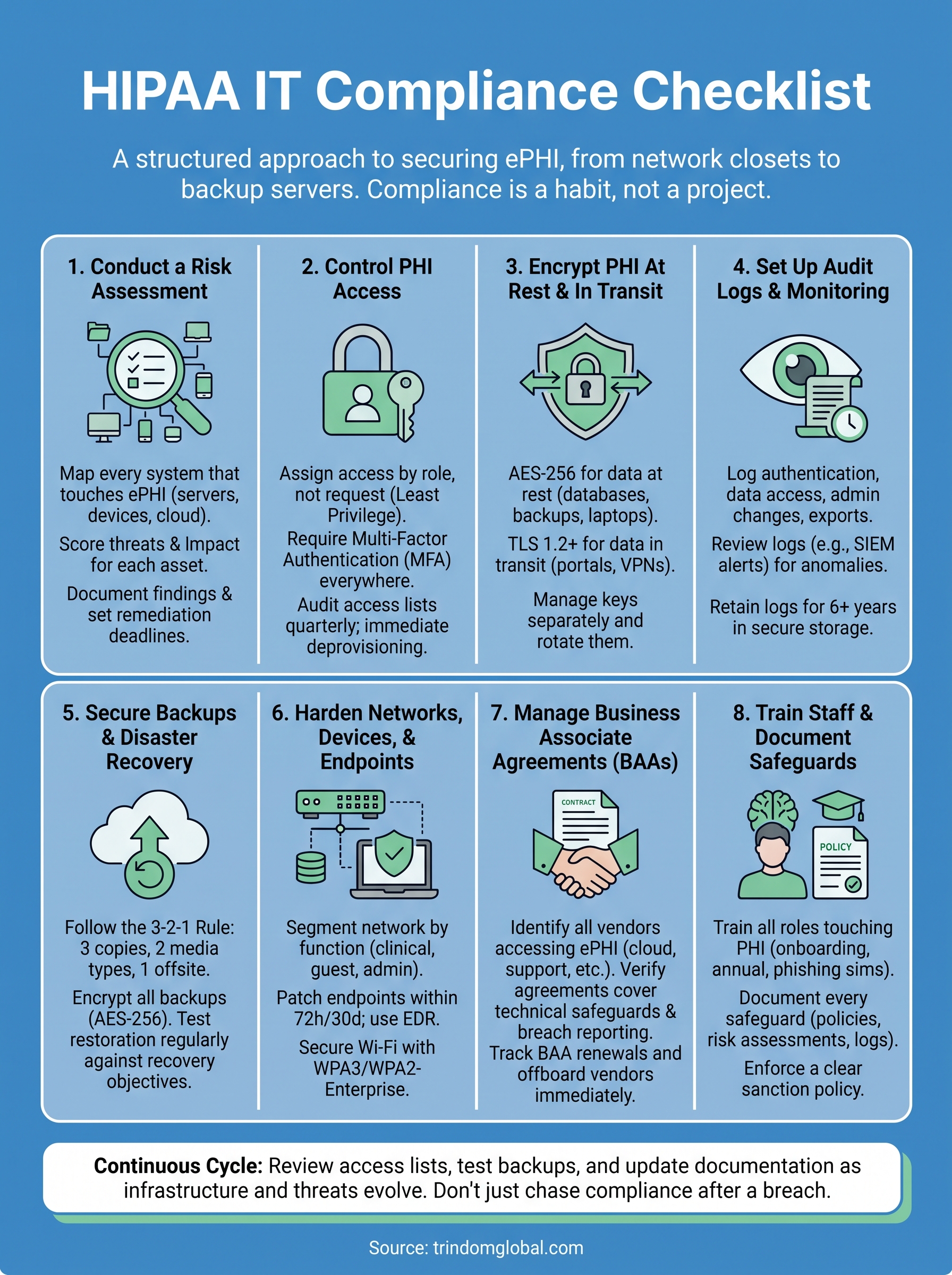
Running through this hipaa it compliance checklist once won’t make you compliant for good. Networks change, staff turn over, and new medical devices join the network every quarter, so the risk assessment you finished in January is already stale by summer. Treat each step here as a recurring cycle, not a project with an end date: review access lists quarterly, test backups twice a year, and revisit your documentation whenever infrastructure shifts.
Building that discipline takes real technical expertise, especially in hospital environments where structured cabling, RF systems, and networked medical equipment all intersect with compliance requirements. If you’re planning a new buildout or auditing existing infrastructure against these safeguards, working with a team that understands both healthcare IT and HIPAA’s technical requirements saves you from learning the hard way. Talk to Trindom Global about IT infrastructure consulting for healthcare environments that keeps ePHI secure and your compliance program defensible, from the network closet to the nurses’ station.


