

Hospitals keep adding connected devices, from infusion pumps to imaging systems, and each one speaks a different technical language until someone forces them to agree. That’s where medical device integration standards come in. Without them, your EHR can’t reliably pull vitals from a bedside monitor, and your imaging archive can’t talk to the scheduling system down the hall.
If you’re trying to understand which protocols actually matter, this guide breaks down the ones you’ll encounter on almost every hospital IT project: HL7 and FHIR for clinical data exchange, DICOM for imaging, and IEEE 11073 for device-level communication. We explain what each standard does, where it fits in your network architecture, and what regulators expect when you’re installing or upgrading equipment.
We’ve built out structured cabling, headend systems, and medical equipment installations in hospital environments long enough to know that standards compliance isn’t optional paperwork, it’s what determines whether a new device actually functions inside your existing infrastructure. This article covers the core standards, how they relate to FDA and interoperability requirements, and practical steps for planning an integration that won’t need to be redone in two years.
Why medical device integration standards matter
Hospitals run on data moving correctly between systems, and patient safety is the first thing at stake when it doesn’t. A bedside monitor that can’t push accurate vitals into the EHR forces nurses back to manual charting, which introduces transcription errors and delays that matter in critical care. Standards exist to remove that guesswork by defining exactly how a device packages, labels, and transmits its data so the receiving system interprets it the same way every time. When you’re installing infusion pumps, ventilators, or imaging equipment across a hospital floor, the integration standard is what guarantees a dose reading or scan result means the same thing to the pharmacy system as it does to the radiologist’s workstation.
A hospital’s most expensive device is worthless to clinical staff if it can’t talk to the systems they actually use.
The financial cost of getting this wrong
Custom, one-off integrations feel cheaper at first because you skip the standards conversation and just build a direct connection between two systems. That shortcut gets expensive fast. Every non-standard interface becomes a maintenance liability that only the original integrator understands, and every future device you add has to be mapped against that same custom logic instead of a known protocol. We’ve walked into hospital IT departments still paying support contracts on interface engines built a decade ago because nobody documented how the connections were made. Standards-based integration front-loads more planning time but produces a system that any qualified vendor can service later, which protects your budget over the equipment’s full lifecycle.
| Approach | Upfront effort | Long-term maintenance | Vendor flexibility |
|---|---|---|---|
| Custom point-to-point integration | Lower | High, requires original integrator | Locked to one vendor |
| Standards-based integration (HL7/FHIR/DICOM) | Higher | Lower, documented and widely supported | Open to multiple vendors |
Interoperability is now a regulatory expectation, not a nice-to-have
Regulators have made clear that interoperability is a patient safety and public health priority, not a vendor convenience feature. The Office of the National Coordinator for Health IT and CMS have pushed information blocking rules and certification requirements that assume your systems can exchange data using recognized standards. The ONC’s Health IT Certification Program explicitly references standards like FHIR as part of what certified systems must support. If your hospital is evaluating new equipment or a network overhaul, assume any regulator, auditor, or accreditation body reviewing your infrastructure will ask how your devices communicate and whether that communication follows an established standard.
Scaling and future equipment purchases get harder without them
Growth is where non-standard integration really shows its limits. A hospital that buys a new imaging system, adds a wing with fresh patient monitoring, or merges with another facility needs its equipment to plug into existing infrastructure without a custom project every time. Facilities that built on HL7, FHIR, DICOM, and IEEE 11073 from the start can bring on new vendors with far less friction, because the receiving systems already expect data in a known format. Ones that didn’t end up with a patchwork of adapters and translation layers, each one a new point of failure and a new thing that can break during an upgrade.
What’s actually at risk when standards get skipped
Skipping standards doesn’t just create technical debt, it creates operational risk that shows up during the moments you can least afford it. Consider what typically breaks down when integration is handled ad hoc:
- Delayed alarms and vitals reaching the EHR because a custom interface can’t keep pace with device output during high patient volume
- Imaging results stuck in silos when a PACS system can’t exchange DICOM data cleanly with a newly added modality
- Failed audits when a compliance review asks for documentation on data exchange methods and none exists
- Vendor lock-in that leaves a hospital paying premium rates for support because only one company understands the custom build
- Rework costs when equipment purchased without standards compliance has to be re-integrated a few years later
Understanding these standards up front is what separates an integration project that holds up for a decade from one you’ll be revisiting within two years. The next section breaks down the specific standards you’ll run into on nearly every hospital IT project, starting with HL7 and FHIR.
The core standards: HL7, FHIR, DICOM, and IEEE 11073
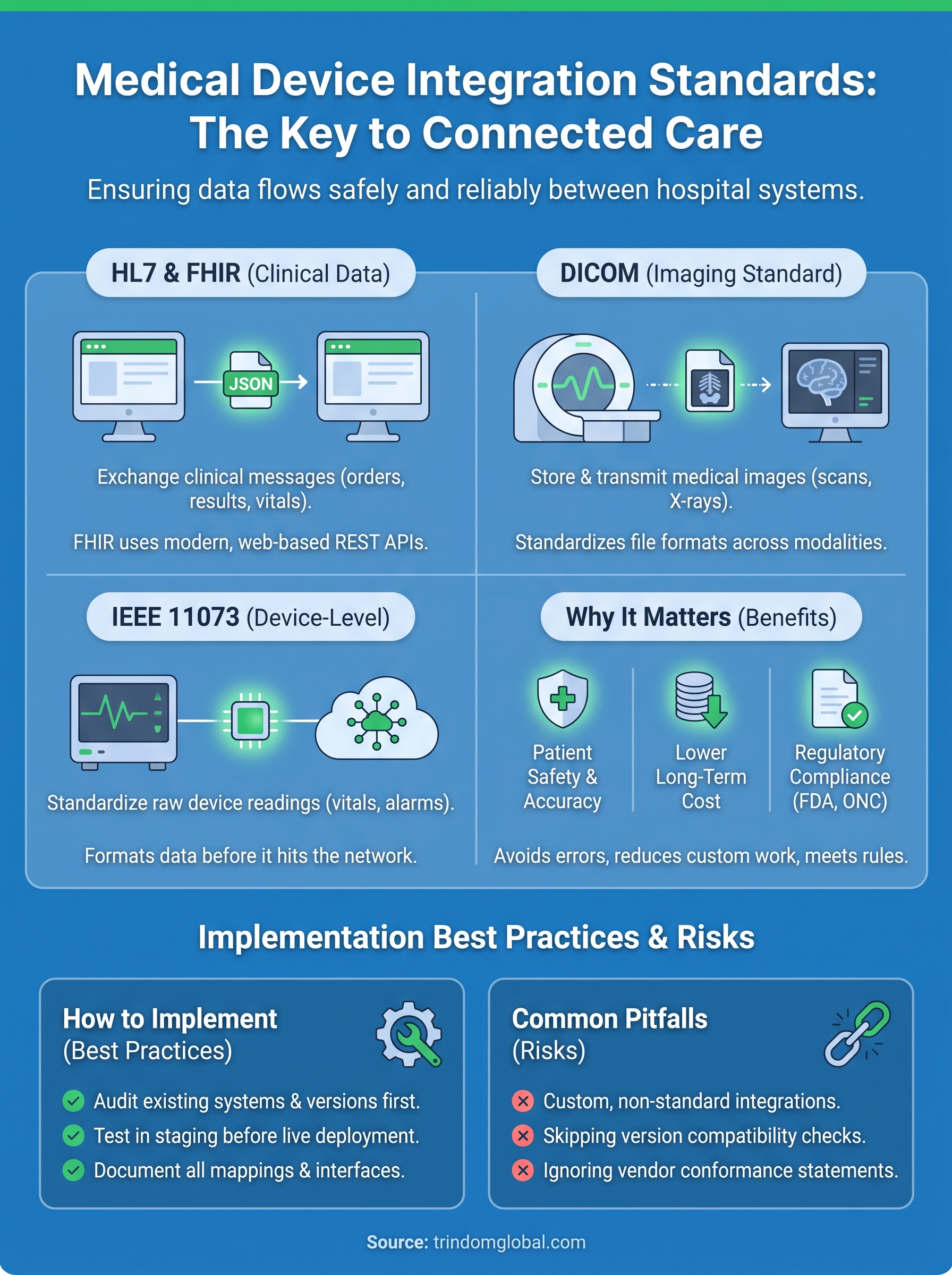
Four standards cover almost everything you’ll touch on a hospital integration project, and each one owns a different piece of the data pipeline. HL7 and FHIR handle clinical messaging between systems like your EHR, lab, and pharmacy. DICOM governs how imaging equipment stores and transmits scans. IEEE 11073 works at the device level, standardizing how a bedside monitor or infusion pump formats the raw data before it ever reaches a network interface. Knowing which standard applies to which layer keeps you from asking a vendor for the wrong kind of compliance.

HL7 and FHIR: clinical data exchange
Health Level Seven International built HL7 in the 1980s to standardize how hospital systems exchange admissions, orders, results, and billing information. Most hospitals still run HL7 v2 messages under the hood, and it works, but the message format is dense and every vendor implements it with slight variations that require custom mapping. FHIR (Fast Healthcare Interoperability Resources) is HL7’s newer specification, built on modern web standards like REST APIs and JSON, and it’s what most new device and software integrations are being built around today. The HL7 organization’s FHIR overview documents the resource-based model that makes this version far easier for developers to implement consistently across vendors.
| Standard | Introduced | Data format | Best fit |
|---|---|---|---|
| HL7 v2 | 1987 | Pipe-delimited text | Legacy EHR, lab, pharmacy interfaces |
| FHIR | 2014 | JSON/XML over REST APIs | New device integrations, mobile health apps, API-driven systems |
If a vendor can’t tell you whether their equipment supports FHIR, HL7 v2, or both, you’re the one who’ll be building the workaround.
DICOM: the imaging standard
Digital Imaging and Communications in Medicine, or DICOM, is what makes a CT scan taken on one manufacturer’s machine viewable on a radiologist’s workstation running different software entirely. It defines the file format for the image itself and the network protocol for transmitting it between modalities, PACS archives, and viewing stations. Every imaging installation we’ve done, from a single ultrasound suite to a full radiology department buildout, lives or dies on whether the equipment’s DICOM conformance statement matches what your PACS actually supports. Mismatched DICOM versions are one of the most common reasons a newly installed scanner can’t push images where they need to go on day one.

IEEE 11073: standardizing the device itself
Before data ever reaches HL7 or FHIR messaging, it starts at the device, and that’s where IEEE 11073 comes in. This standard, often called the Personal Health Data or Point-of-Care standard depending on the profile, governs how devices like glucose monitors, ventilators, and patient monitors structure and transmit their raw readings. Devices built to IEEE 11073 can plug into a hospital’s medical device integration platform without a vendor-specific driver for every single unit, which matters enormously once you’re managing hundreds of bedside devices across multiple floors. Skipping this layer usually means your integration engine ends up doing translation work that the device itself should have handled from the start.
How to implement medical device integration standards
Implementation starts long before a single device gets plugged in. Planning the integration means mapping out which standard applies to which system, confirming vendor conformance statements match what you already run, and building in testing time before anything touches a live patient care unit. Rushing this stage is how hospitals end up with a scanner that can’t push images or a monitor whose vitals never reach the EHR on install day.
Start with an infrastructure and systems audit
Begin by cataloging what’s already in place. Pull the conformance statements for your existing PACS, EHR, and interface engine, then compare them against the specs of whatever equipment you’re adding. Gaps show up here more often than anywhere else in a project, usually because a facility upgraded its EHR years ago and nobody checked whether the new version still supports the HL7 v2 messages older devices send.
- List every system that needs to exchange data with the new equipment
- Pull DICOM conformance statements for imaging gear and PACS
- Confirm HL7 v2 or FHIR support on both the sending and receiving systems
- Check IEEE 11073 compliance on bedside devices before purchase, not after
Choose an integration engine that fits your scale
Most hospitals route device data through an interface engine or integration platform rather than building direct connections between every pair of systems. This middleware translates between HL7 v2, FHIR, and device-level protocols so you’re not writing custom code for every new piece of equipment. A small clinic might get by with a lightweight engine handling a few dozen interfaces, while a multi-site hospital system needs something built to scale across thousands of device connections without becoming its own maintenance headache.
The integration engine you pick today is the thing every future device purchase has to work around.
Map data flows before you touch production systems
Getting the standard right on paper doesn’t guarantee it works in practice. Draw out exactly where data originates, what standard carries it, and where it lands, then test that path in a staging environment before connecting anything to live clinical workflows. We run this mapping exercise on every medical equipment installation because it catches version mismatches, like a device sending FHIR R4 to a system that only parses STU3, while there’s still time to fix it without disrupting patient care.
Document the build and train the people who’ll maintain it
Hospitals change staff more often than they change infrastructure, so documentation is what keeps an integration functioning after the original team moves on. Record every interface, every mapping decision, and every deviation from the base standard, then hand that documentation to whoever manages the system day to day. Facilities that skip this step are the ones we see paying premium support fees years later because only one person ever understood how the pieces fit together, and that person left.
Regulatory and compliance requirements to know
Regulators don’t treat medical device integration standards as optional engineering choices, they treat them as evidence that a hospital can move patient data safely. Before you sign off on any equipment purchase, you need to know which agency governs which part of the integration and what documentation they’ll expect during an audit or accreditation review. Skipping this step doesn’t just risk a citation, it can delay a device going live if inspectors flag a gap in your compliance paperwork.
FDA oversight of connected medical devices
The FDA regulates the devices themselves, including how they’re labeled, tested, and cleared for interoperability with other systems. Devices that exchange data with an EHR, monitor, or infusion system fall under the agency’s guidance on interoperable and connected devices, and the FDA’s guidance on design considerations for interoperable medical devices outlines what manufacturers need to demonstrate before clearance. As the installer, your job is confirming the equipment you’re bringing in actually matches its cleared configuration, because modifying how a device transmits data after installation can move it outside its original FDA clearance.
A device that’s FDA-cleared as standalone equipment isn’t automatically cleared to integrate the way you’re planning to use it.
ONC and CMS interoperability rules
The Office of the National Coordinator for Health IT and CMS have built information blocking and certification rules around the assumption that certified health IT systems support standards like FHIR. If your hospital receives federal reimbursement, expect audits to check whether your systems can exchange data on request rather than trapping it in a proprietary format. This is where the standards conversation stops being a technical preference and becomes a condition of participation in federal programs.
HIPAA and data security across the integration
Every interface you build, whether it’s HL7, FHIR, or DICOM, carries protected health information across a network, which puts it squarely under HIPAA’s security rule. Encryption in transit, access controls on the interface engine, and audit logs showing who accessed what data all need to be part of the design, not an afterthought bolted on after go-live. We treat this as part of the same planning phase as the standards mapping, because a compliant data format doesn’t help you if the transmission itself isn’t secured.
Documentation auditors will actually ask for
When a compliance review or accreditation visit happens, having the right paperwork ready saves days of scrambling. Keep these on file for every integrated device:
- DICOM conformance statements and IEEE 11073 compliance records for connected equipment
- Interface specifications showing which HL7 version or FHIR resource each connection uses
- Risk assessments covering data security across each integration point
- Change logs documenting any modification made after initial installation
Facilities that maintain this documentation as they build, rather than reconstructing it after an audit request, consistently move through reviews faster and with fewer follow-up questions.
Common integration challenges and how to solve them
Even with the right standards chosen, integration projects hit predictable snags during implementation. Vendor variation is the most common one you’ll run into. Two systems can both claim HL7 v2 compliance and still fail to talk to each other cleanly, because the standard leaves room for optional fields and custom segments that vendors fill in differently. Recognizing which problems are routine versus which ones signal a deeper mismatch saves you weeks of troubleshooting on-site.

Version mismatches between HL7 v2, FHIR, and DICOM releases
A newer device sending FHIR R4 resources to a system still parsing STU3 will fail silently or drop fields the receiving side doesn’t recognize. The same problem shows up in imaging, where a modality running a newer DICOM conformance statement pushes image attributes a legacy PACS system was never built to read. Test every connection in staging against the exact version numbers on both ends, not just the general standard name, before it goes anywhere near a live patient floor.
Two systems that both claim standards compliance can still fail to exchange data if they’re built on different versions of that same standard.
Custom fields and vendor-specific extensions
Manufacturers routinely add proprietary fields on top of a base standard to support features their competitors don’t offer. That’s fine until your interface engine needs to map those custom fields into something your EHR or PACS understands, which means extra configuration work every vendor swap requires you to redo. Ask for a full field-level mapping document from the vendor before purchase, not after installation, so you know exactly what’s standard and what’s custom.
Network capacity and latency for high-volume data
Imaging files and continuous monitor streams put real strain on hospital networks, and DICOM transfers in particular can bog down a poorly planned network segment. A radiology department pushing large imaging studies over the same backbone carrying real-time patient monitoring data risks delays on both sides if bandwidth isn’t planned for peak load. This is squarely a structured cabling and network design problem as much as a software one, which is why we map data flows against physical network capacity during the same planning phase, not as a separate afterthought.
Legacy equipment that predates modern standards
Hospitals rarely replace every device at once, so you’ll almost always be integrating brand-new equipment alongside monitors or pumps installed a decade ago that never supported IEEE 11073 or FHIR in the first place. Common fixes include:
- Protocol gateways that translate proprietary legacy output into HL7 or FHIR messages the rest of the system understands
- Phased replacement schedules that retire non-compliant devices as budget allows rather than all at once
- Isolated network segments for legacy gear that can’t meet current security requirements, keeping it functional without exposing the rest of the network
None of these fixes are permanent solutions, they’re bridges that buy time until the older equipment reaches end of life. Budgeting for that eventual replacement now, rather than treating the workaround as indefinite, keeps the patchwork from becoming its own long-term liability.
Best practices for choosing standards and vendors
Picking the right standard is only half the job. The vendor you choose to implement it determines whether that standard actually delivers the interoperability you’re paying for. Vendor selection deserves the same scrutiny as the technical spec sheet, because a company that treats standards compliance as a checkbox rather than a design principle will leave you with the same integration headaches you were trying to avoid in the first place.
Ask for conformance statements, not marketing claims
Any vendor can put “HL7 compliant” or “DICOM ready” on a spec sheet. What matters is the actual conformance statement, the document that spells out exactly which message types, fields, and versions their equipment supports. Request this before you sign a purchase order, not after the device arrives on your loading dock. Compare it line by line against what your existing systems can parse, and don’t accept a verbal assurance in place of the paperwork.
- Full DICOM conformance statement for imaging equipment
- HL7 v2 or FHIR resource-level documentation for clinical data devices
- IEEE 11073 profile details for bedside monitoring hardware
- A written list of any proprietary extensions layered on top of the base standard
Weigh procurement requirements alongside technical fit
Government and healthcare procurement often carries requirements beyond raw technical capability, including preferences or mandates around minority and women-owned business enterprises. Factor that into your vendor shortlist early, because an integrator who understands both the standards work and the procurement paperwork saves you a separate compliance headache later. A vendor with certified MWBE status and hands-on hospital integration experience checks two boxes at once instead of forcing you to manage them separately.
Test interoperability before you finalize the purchase
Spec sheets tell you what a device is supposed to do. A staging environment tells you what it actually does. Before committing budget to a large equipment order, run a pilot connection between the new device and your live interface engine, using real message traffic rather than sample data the vendor provides. This catches version mismatches, missing fields, and latency issues while you still have leverage to negotiate fixes or walk away.
The best time to discover a vendor’s standard doesn’t match yours is during a pilot test, not during a live install.
Build vendor relationships that outlast the installation
A device that integrates cleanly on day one can still become a liability if the vendor disappears after the sale. Ask how long they’ll support the current standard version, whether they publish updates when FHIR or DICOM specs revise, and who handles troubleshooting once your warranty period ends. We prioritize vendor partnerships that stay engaged past installation, because standards evolve and a manufacturer who keeps pace with those changes protects the integration work you’ve already paid for.
Putting these standards into practice
HL7, FHIR, DICOM, and IEEE 11073 aren’t abstract compliance boxes to check off before an install. They’re what determines whether the equipment you’re buying today still fits your infrastructure five years from now, and whether your team spends its time on patient care instead of chasing down why a monitor’s data never reached the EHR. Standards compliance protects the budget you’ve already committed and keeps every future device purchase from turning into its own custom project.
Getting this right takes more than reading a spec sheet. It takes someone who’s mapped conformance statements against real hospital networks and caught the version mismatches before they hit a live floor. That’s the kind of design-build planning we bring to every medical equipment installation. If you’re planning a new install or an infrastructure upgrade and want it built on standards that hold up, talk to Trindom Global about your project before you sign off on equipment.


